
ENGLAON 3 Years Extended Warranty – How Do I Add It?Updated 5 months ago
ENGLAON 3 Years Extended Warranty – How Do I Add It?
ENGLAON offers a 3 Years Extended Warranty option on selected TV models.
Please note: “3 Years Extended Warranty” means a total of 3 years of warranty coverage from the original date of purchase, including the standard manufacturer’s warranty period. It does not mean 3 extra years on top of the standard warranty.
How Can I Check the Price and Add It?
The price of the 3 Years Extended Warranty depends on the TV model.
To check the price and add it to your order:
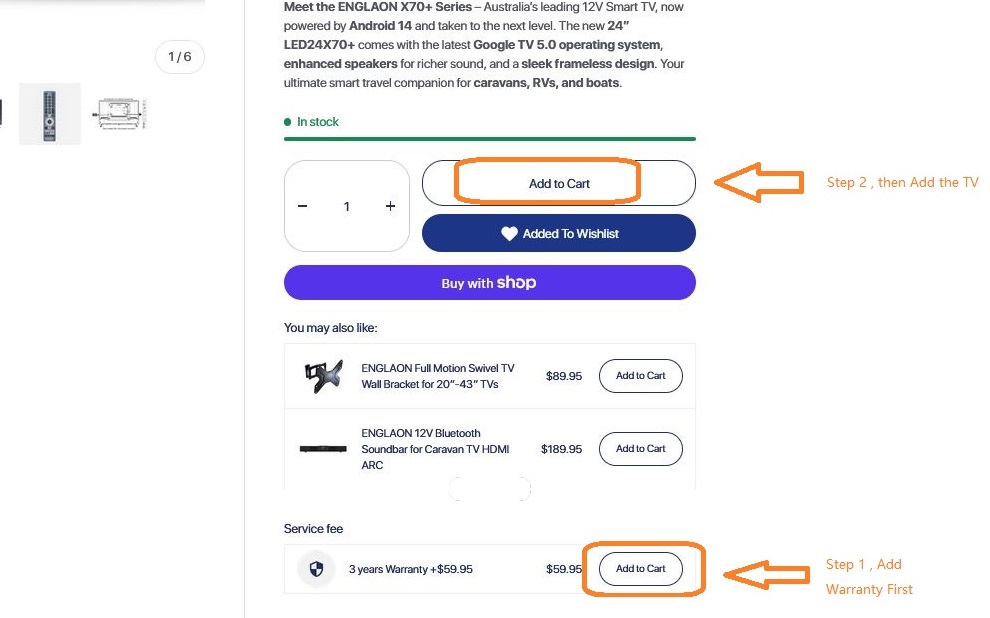
- Go to the product page of your ENGLAON TV
- Scroll down to the Service fee section
- Find the 3 years Warranty option and check the applicable price
- Click Add to Cart for the warranty first
- Then click Add to Cart for the TV
Important Notes
- Extended warranty pricing may vary by model
- The warranty is a separate add-on item
- It is not added automatically unless selected
- It should be added at the time of purchase
- Extended warranty is not eligible for discount offers, sale pricing, promo codes, or other promotional discounts
Frequently Asked Questions
What does “3 Years Extended Warranty” mean?
It means your product has a total of 3 years of warranty coverage from the original purchase date, including the standard manufacturer’s warranty period.
It does not mean 3 additional years on top of the standard warranty.
Can I buy the extended warranty after I have already placed my order?
We recommend purchasing the extended warranty at the time of ordering.
If your order has already been placed, please contact our support team as soon as possible. Any request to add extended warranty after checkout is subject to order status, eligibility, and approval. It may not be available for all orders.
Is the extended warranty discounted during sales or promotions?
No. The extended warranty is not discounted and is not eligible for sale pricing, promotional offers, bundle discounts, or promo codes.