
How to Format a USB Stick to FAT32Updated 6 months ago
How to Format a USB Stick to FAT32
Formatting your USB drive to FAT32 ensures compatibility with many devices such as TVs, soundbars, firmware updates, and media players.
Windows (Most Common Method)
Insert the USB stick into your computer.
Open File Explorer.
Locate the USB drive under “This PC.”
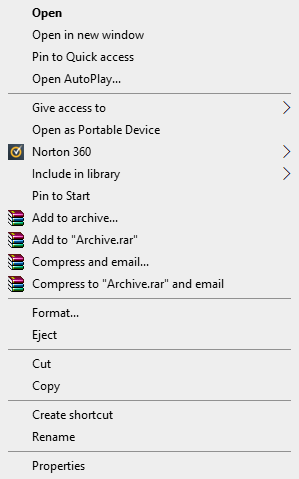
Right-click the USB drive.
Click Format.
Under File System, select FAT32.
Keep Allocation unit size as Default.
Ensure Quick Format is checked.
Click Start.
Click OK to confirm.
⚠️ Important: Formatting will erase all files on the USB drive.
MacOS (Mac)
Insert the USB stick.
Open Disk Utility.
Select the USB drive from the left panel.
Click Erase.
Under Format, select MS-DOS (FAT).
Choose Master Boot Record (MBR) for the scheme.
Click Erase.
Note: On macOS, MS-DOS (FAT) is the equivalent of FAT32.
Quick Check After Formatting
After formatting, confirm:
The USB is empty
The file system shows FAT32
Files are placed directly on the USB (not inside folders) if required for firmware updates.